

The booking element
<kipdown-booking> puts Kipdown’s booking page in a website’s own document. It needs no account, API key or server code on the website. For a builder that cannot run module scripts, use the booking frame.
Before you start
Section titled “Before you start”The owner needs stays and prices set up, and Taking bookings online switched on in Settings → Where guests book. The owner’s instructions explain where to copy their business’s code.
Add the element
Section titled “Add the element”-
Get the business’s
sitevalue from its copied code. Keep this value exactly as supplied. -
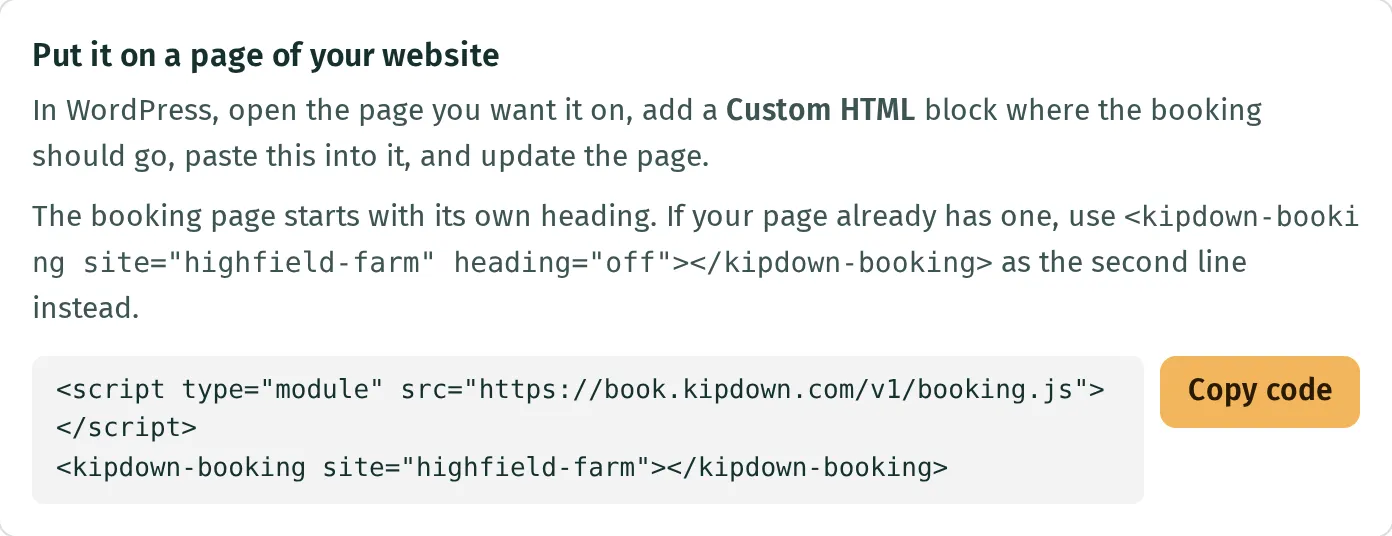
Load the module and put the element where booking should appear:
<script type="module" src="https://book.kipdown.com/v1/booking.js"></script><kipdown-booking site="your-business"></kipdown-booking> -
Open the published page on an allowed website and check the dates, guest details and confirmation. A preview in a website builder may use a different address from the published website.
The element fills the available width. Its layout responds to its own width, including when it sits in a narrow column. It supplies its heading and introduction; use heading="off" if the surrounding page has its own.
Attributes
Section titled “Attributes”| Attribute | Values and behaviour |
|---|---|
site |
Required. The business’s id from its copied code. |
page |
book by default; manage shows a guest’s existing booking. Other values use the booking page. |
api |
The origin hosting Kipdown’s booking API. Defaults to the origin the module was loaded from, normally https://book.kipdown.com. Leave it out for a normal installation; it does not bypass website restrictions. |
heading |
off hides the page’s heading and introduction. Omitted, or any other value, shows them. On the booking page they show while choosing a stay. |
photos |
Omitted or strip shows the business’s general photos as a strip with captions. off hides those photos; mosaic shows a listing-style arrangement with the line about the business. This does not hide the individual stays’ photos. Applies to page="book". |
preview |
A boolean attribute: its presence shows the booking page even before online booking is switched on. It stops before making a booking. Remove it to take real bookings; preview="false" still enables preview. Applies to page="book". |
Changing these attributes restarts the element. Several elements can share a page; only the first booking element reads and updates booking choices in the page’s address.
A page for managing bookings
Section titled “A page for managing bookings”<script type="module" src="https://book.kipdown.com/v1/booking.js"></script><kipdown-booking site="your-business" page="manage"></kipdown-booking>A guest’s link carries ?ref=REFERENCE#key=KEY. The reference alone is not enough. Keep the key in the fragment after #, and preserve it when linking to this page. The usual confirmation link already opens Kipdown’s hosted management page; adding an element elsewhere does not change that link by itself.
Links with choices filled in
Section titled “Links with choices filled in”The booking page reads these query parameters from its address. For a frame, put them in the frame’s src instead.
| Parameter | Meaning |
|---|---|
unit |
One stay’s slug, such as bell-tent. |
units |
How many of it to book. Defaults to one, increased if the party needs more, within the stay’s online limit. |
places |
Comma-separated place ids, where guests choose named places. |
arrive, leave |
Arrival and departure dates as YYYY-MM-DD. |
adults, children |
Guest counts; defaults are two adults and no children. |
item |
Repeat for several different stays: item=bell-tent.1.2.0 means slug, quantity, adults, children. When recognised items are present, they take precedence over unit. |
q.<id> |
A booking question’s answer, using its question id. |
For example, /book/?unit=bell-tent&arrive=2027-08-13&leave=2027-08-16&adults=2 goes straight to the details step with that stay and those dates. The price and availability are still checked. Without dates, a recognised unit is selected on the choosing screen.
Match the website’s look
Section titled “Match the website’s look”Set CSS custom properties on the element or an ancestor. The element uses the surrounding page’s fonts by default.
kipdown-booking { --kd-accent: #315c45; --kd-on-accent: #ffffff; --kd-font: system-ui, sans-serif; --kd-font-display: Georgia, serif; --kd-radius: 0.5em; --kd-scroll-margin: 5rem; --kd-sticky-top: 5rem;}| Property | Controls |
|---|---|
--kd-accent, --kd-on-accent |
Accent colour and text on it. Without an explicit text colour, Kipdown chooses light or dark text from the accent’s lightness. |
--kd-ink, --kd-ink-soft, --kd-ink-quiet |
Main, secondary and quieter text. |
--kd-surface, --kd-panel, --kd-line |
Main background, panel background and borders. |
--kd-ok, --kd-warn |
Success and warning colours. |
--kd-radius |
Corner radius. |
--kd-font, --kd-font-display |
Body and heading font families. |
--kd-scroll-margin |
Space above a step when Kipdown scrolls it into view; defaults to 1.5em. |
--kd-sticky-top |
Offset for parts that stay in view. Defaults to --kd-scroll-margin, or 1.5em. |
It uses the page’s document rather than a shadow root so card payments and the robot check work. Its classes begin kd- and its styles are scoped to the element. Broad CSS rules on your website can still affect its contents; check the published page after applying your theme.
Which websites may take bookings
Section titled “Which websites may take bookings”The API checks the page’s origin: scheme, hostname and port. It allows the business’s website with or without www., its configured booking and management page origins, Kipdown’s hosted booking pages, and any additional websites registered for that business. This is not a wildcard for all subdomains.
A different website, including a staging address, needs to be registered. Owners cannot add one themselves yet; ask hello@kipdown.com. The frame works on other websites because its booking page runs at Kipdown’s origin.
If booking is refused, check the published page’s address first. A closed booking page also needs Taking bookings online switched on; preview is only for trying the page.
Version guarantee
Section titled “Version guarantee”Changes under /v1/ preserve the meaning of attributes, CSS custom properties and booking words. A breaking change would use /v2/. Use the public properties above for styling rather than depending on the element’s internal HTML.