

Guests' personal details
Kipdown keeps a guest’s contact details with their bookings so your team can manage their stay. When a guest asks you to remove their personal details, an owner can use Forget this guest while keeping the dates and money for the accounts.
Who can see the details
Section titled “Who can see the details”Owners and staff can open full bookings, including the guest’s name, email address, phone number, notes and answers to booking questions. Cleaners see the changeover sheet, which has preparation information rather than full booking access. Only owners can forget a guest or download spreadsheets.
Before you start
Section titled “Before you start”Check the booking and email address carefully. Forgetting applies to every booking for your business with that same email address. If the selected booking has no email address, it applies only to that booking. It does not find other bookings by name or phone number.
Forget a guest
Section titled “Forget a guest”- As an owner, open Bookings.
- Find the guest using the search box. You can search by name, email, phone or booking reference; enter at least two characters. Open the matching booking.
- Scroll to History and press Forget this guest below it.
- Read the confirmation, including the email address whose bookings will be affected. Press Keep their details to leave without changing anything, or Forget them to remove the details.
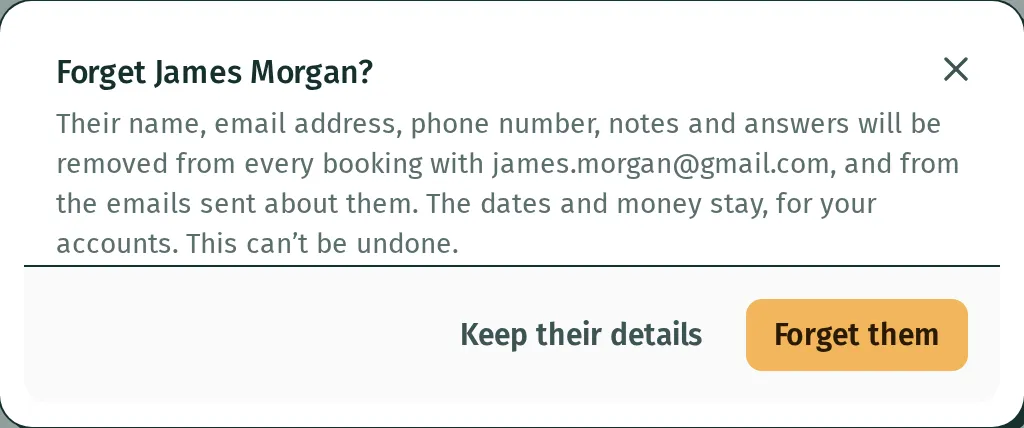
The booking then shows a message under Guest explaining that the details are gone. The notification tells you if more than one booking was affected.

What is removed and what stays
Section titled “What is removed and what stays”Kipdown removes the guest’s name, email address, phone number, their message, your notes and their answers from the affected bookings. It also clears payment notes and stored copies of emails about those bookings, withdraws emails still waiting to go, and disables the old guest links and saved card details.
Gift vouchers found through that email address also lose their personal details, messages and stored emails. Their codes, values and spending remain.
Booking references, dates, stays, extras, prices, recorded payments and refunds remain. The history records that the guest was forgotten.
Copies already outside Kipdown, such as delivered emails and downloaded spreadsheets, are not removed by this action. It does not erase the payment records Stripe keeps.
If Forget this guest is missing
Section titled “If Forget this guest is missing”The button is owner-only. It is also hidden for closed dates, a guest already forgotten, a booking without a name or contact details, and bookings brought in from another site’s calendar. For a calendar booking, the guest’s details are kept by the other booking site; deal with them there.
If Kipdown says the booking was being paid for, wait a minute and try again. Kipdown has no setting here to forget guests automatically after a chosen retention period.