

Connect Airbnb, Hipcamp, Pitchup and Booking.com
Exchange calendar links with another booking site so its bookings take up space in Kipdown, and it can see when you are full or closed. You must connect both directions. Giving the other site your link alone does not bring its bookings into Kipdown.
Before you start
Section titled “Before you start”Add your stays in Stays and prices. On the other booking site, you need access to export its calendar and import another calendar. Look for iCal or calendar sync there. Whether these options are available depends on that site’s service and your account.
Match each calendar to the right stay. A cottage listed separately on Airbnb needs the link for that cottage, rather than the link covering all your cottages.
Give the other site your Kipdown link
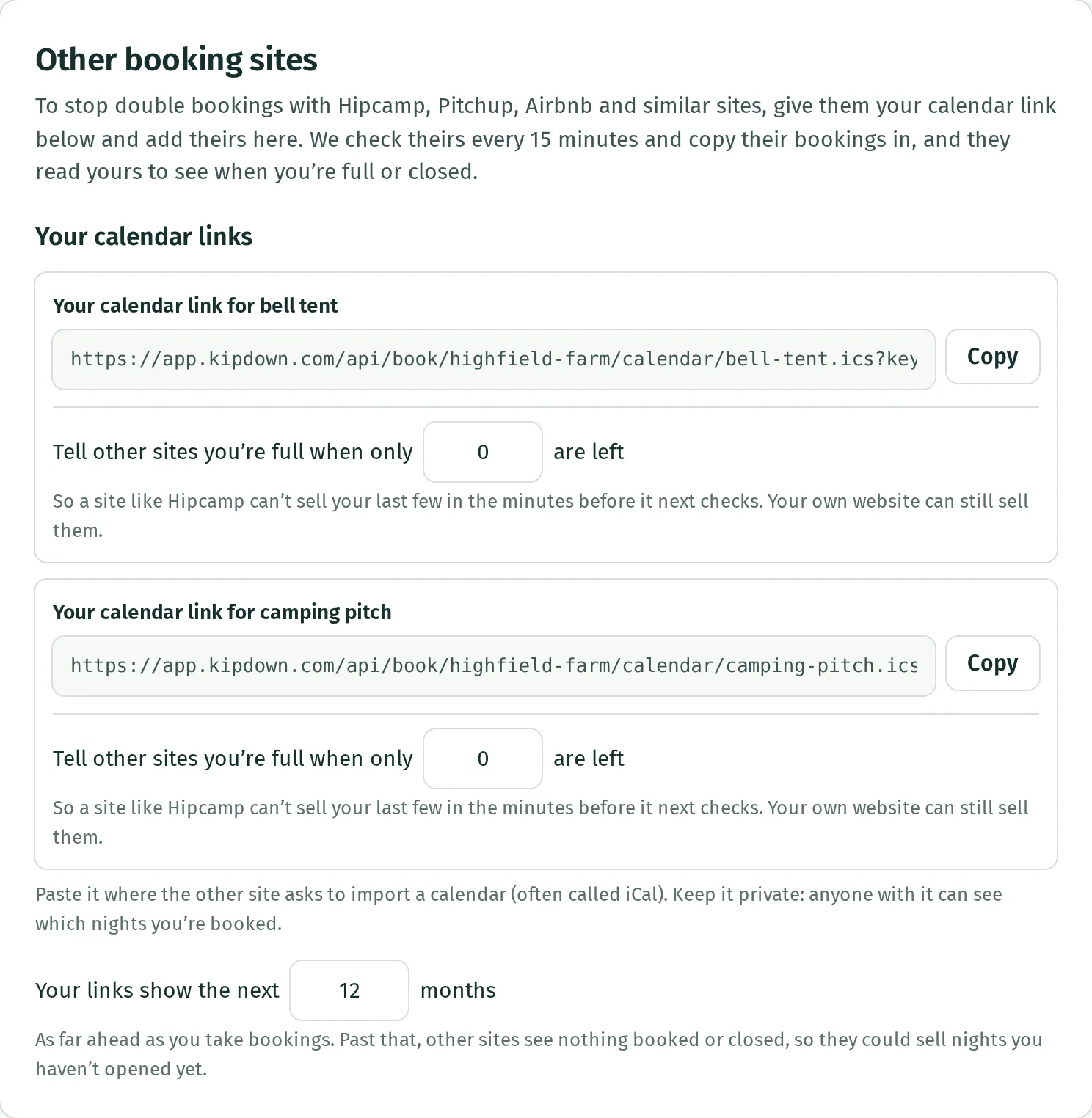
Section titled “Give the other site your Kipdown link”- Open Settings → Other booking sites.
- Under Your calendar links, find the stay listed on the other site and press Copy. For a named place listed on its own, use its Copy link button instead.
- On the other site, find its option to import a calendar. Paste your Kipdown link and save it there.
- Back in Kipdown, set Your links show the next to cover as far ahead as you sell on the other site. You can choose 1 to 36 months.
Beyond that window, the other site sees nothing booked or closed. Keep the link private: anyone with it can see which nights are unavailable.
Bring the other site’s bookings into Kipdown
Section titled “Bring the other site’s bookings into Kipdown”- On the other site, copy its export calendar or iCal link.
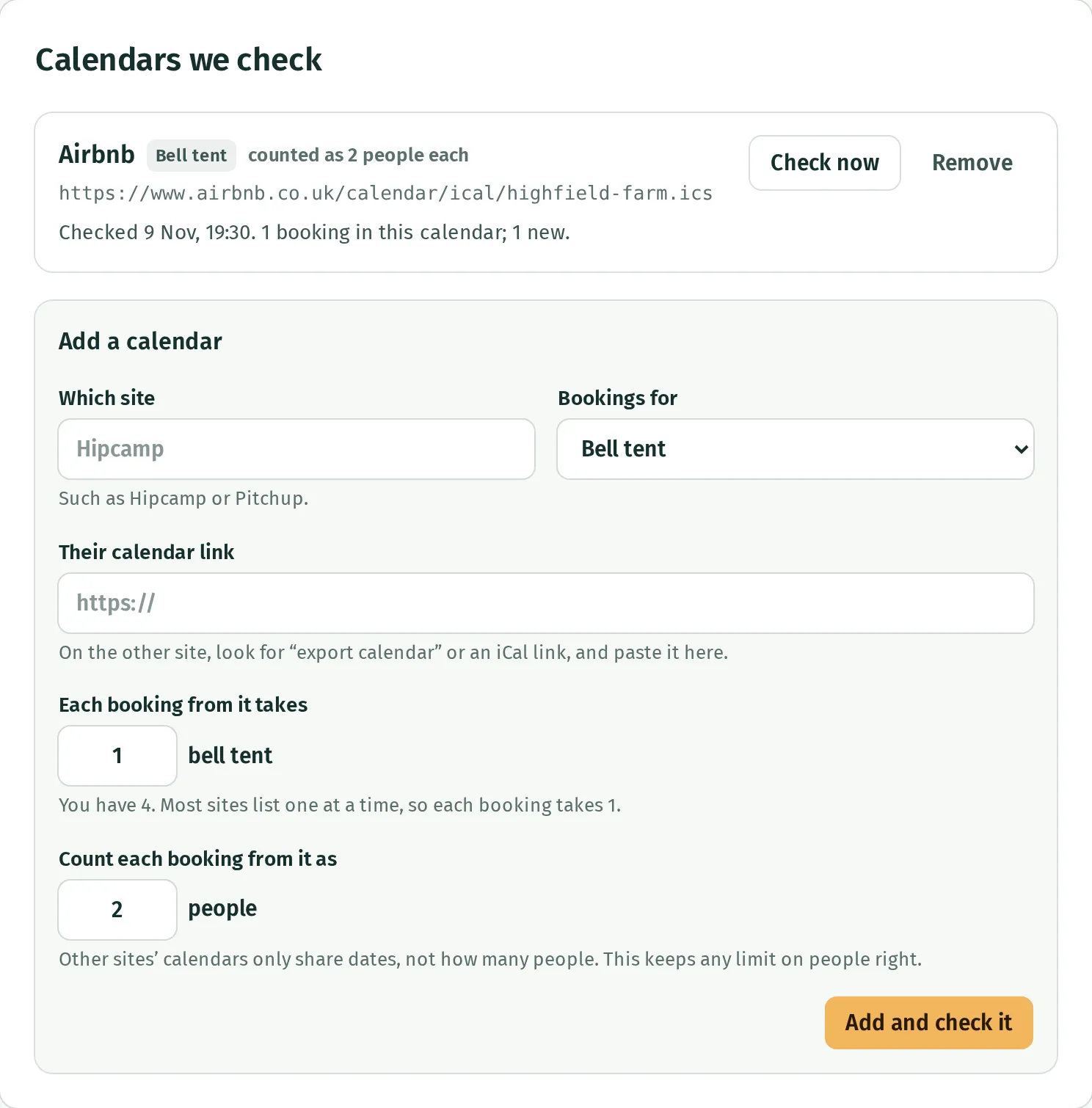
- In Kipdown’s Settings → Other booking sites, go to Calendars we check → Add a calendar.
- Enter Which site, such as Airbnb, and choose Bookings for. If the calendar is for one named place, choose it under Which one?.
- Paste the export link into Their calendar link.
- Where shown, set Each booking from it takes to the number of pitches, tents or rooms one booking uses. Set Count each booking from it as to the number of people to allow for. Calendars do not reliably share guest numbers, so Kipdown uses this number for your people limit.
- Press Add and check it and read the result.
The saved calendar shows when it was last checked and what happened. Use Check now to read it again. Repeat for each listing or calendar you need.
Imported bookings appear in Calendar and Bookings. Their payments stay on the site where they were made; Kipdown does not collect or reconcile that money.
Allow for the delay
Section titled “Allow for the delay”Kipdown checks connected calendars every 15 minutes. The other site decides when it reads your Kipdown link. Check now only refreshes the calendar coming into Kipdown.
For stays with several places, Tell other sites you’re full when only … are left can keep the last few available only through Kipdown. This reduces the risk of both sites selling the last place between checks.
If a calendar will not check
Section titled “If a calendar will not check”Read the message beside it. A normal listing-page link is not an export calendar link. Copy the iCal link from the other site and check that it opens without signing in.
Kipdown keeps existing dates blocked when a calendar fails or appears to have lost bookings unexpectedly. Check the bookings on the original site before cancelling anything here. See what needs you on Today for warnings on Today.
There is no edit button for a saved calendar. To replace its link or change what each booking counts as, remove it and add it again. Read Stop syncing first, because removal opens its future dates here.
Stop syncing
Section titled “Stop syncing”Press Remove, then confirm Stop syncing. Future bookings from that calendar are cancelled in Kipdown and those dates open here. This does not cancel the bookings on the other site. Remove Kipdown’s imported link on that site too if you want to stop both directions.
Calendar sync shares availability, not prices, extras or a complete guest record. There is no live connection that updates another site’s prices. For the link format and exactly what a calendar contains, see calendar links.