

Insights: your reports
Use Insights to see how your season is going: nights sold, how full you are, income and where bookings came from. It includes confirmed stays already taken and confirmed stays still to come.
Before you start
Section titled “Before you start”You must be an owner. Staff and cleaners cannot see these reports. Set your opening dates and the number of places you offer accurately, because these affect How full.
Open your report
Section titled “Open your report”- Open Insights in the menu.
- Choose a Year.
- In Dates, leave The whole year selected, or choose one of your opening periods. This selector appears when you have opening periods for that year.
- Read the totals and Income by month, then scroll down to By month, By what’s booked and Where bookings came from.
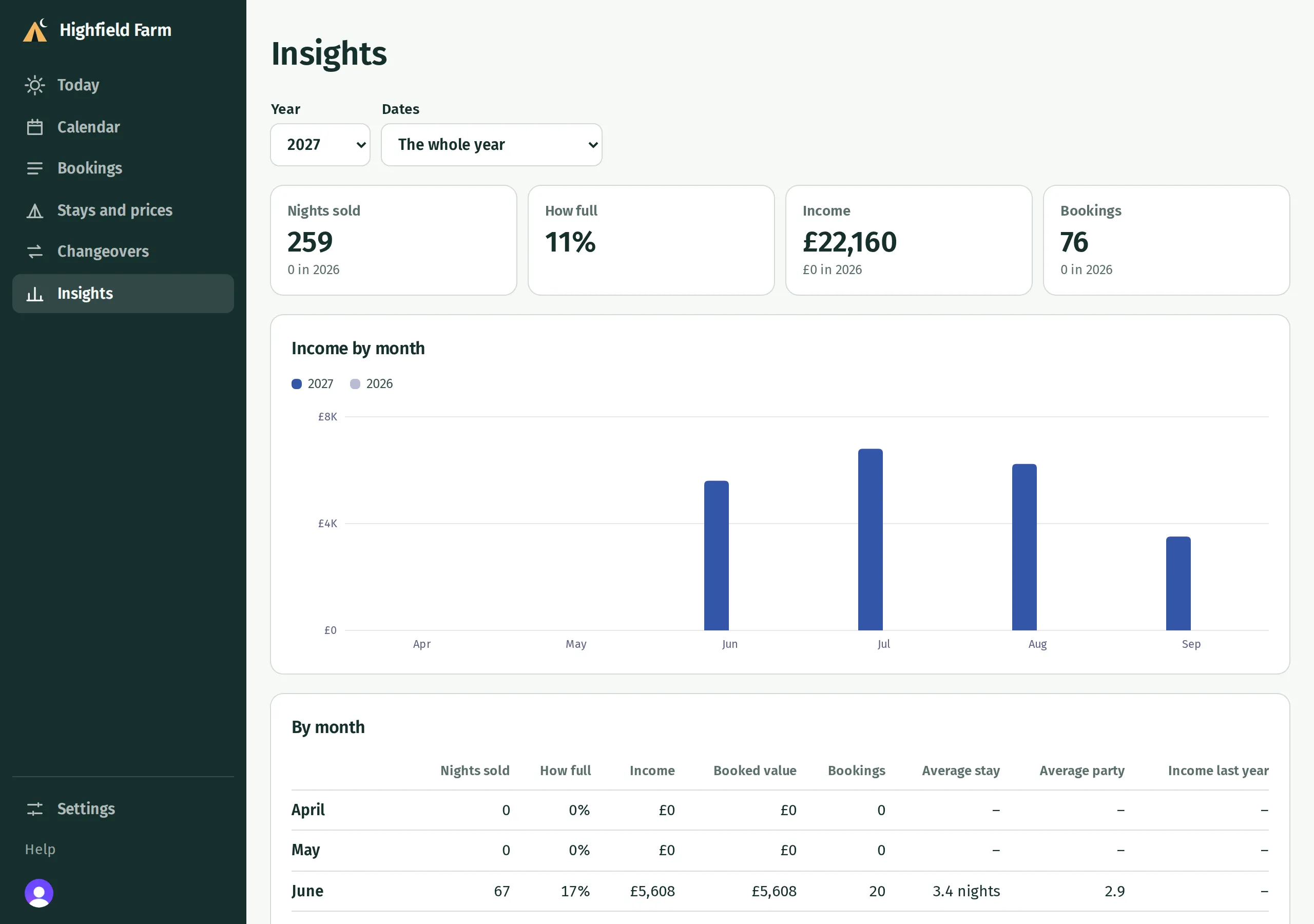
The whole-year report compares income with the previous year. Choosing an opening period removes that comparison. Hover over a chart column, or focus it with your keyboard, to read its amount; the table gives the figures too.
What the figures mean
Section titled “What the figures mean”| Figure | How Kipdown counts it |
|---|---|
| Nights sold | Each pitch or place for each night. Two pitches for three nights count as six nights sold. |
| How full | Nights taken as a percentage of nights available, for stays with a set capacity. Opening dates and dates you closed affect availability. Stays with no limit are left out of this percentage; their own row says No limit. |
| Income | The price of confirmed stays, spread evenly across their nights. A stay crossing a month end contributes to both months. This measures the value of stays, rather than money received into your bank. |
| Booked value | The full price of stays arriving in the selected dates, counted in their arrival month. |
| Bookings | Confirmed stays arriving in the selected dates. A booking containing two stays can count twice. |
| Average stay | The average number of nights in those arriving stays. |
| Average party | The average number of adults and children in those arriving stays. |
Money is shown in rounded whole pounds. Where bookings include VAT, the figures include it.
Where bookings came from
Section titled “Where bookings came from”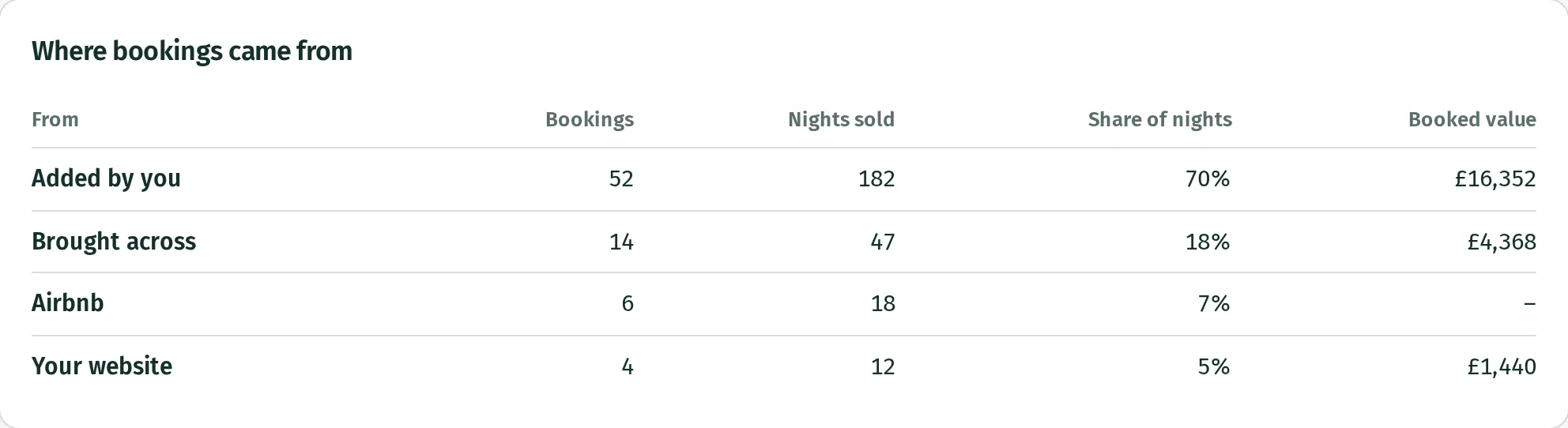
Your website includes bookings guests made through your Kipdown booking page. Added by you includes bookings entered by your team. Imported bookings are grouped under Brought across, even if you brought them from several systems. Calendar bookings use the calendar’s name.
Calendars from other booking sites do not share prices. Those stays add nights and occupancy, but no income or booked value. This can make income look low when much of your business comes through those calendars.
If the figures differ from your accounts
Section titled “If the figures differ from your accounts”Unfinished bookings, bookings waiting for a bank transfer and cancelled stays are excluded. Payments and refunds are recorded on the dates the money moved, so they need not match income by night. Use Spreadsheets and downloads for those records.
What you can’t do yet
Section titled “What you can’t do yet”There is no custom date-range box on Insights; choose a year or an opening period. Choosing a period belonging to one kind of stay changes the dates of the report, but still includes other kinds of stay on those dates. It does not filter the report to that kind alone.